This is a translation of the original article:
📄 ポケットモンスター ファイアレッド・リーフグリーン 殿堂入り(任意コード実行)
It was entirely processed by Claude Opus 4.7 in Claude Code with the Notion MCP.
This article explains how to reach the Hall of Fame in Pokémon FireRed and LeafGreen using arbitrary code execution. It can be used in the Any% No Save Corruption speedrun category, where the goal is to reach the Hall of Fame as quickly as possible with glitches allowed (but resets during saving disallowed).
Hall of Fame Procedure
Environment
This guide only works with the Japanese versions of Pokémon FireRed and LeafGreen. It does not work with any non-Japanese version. Both the GBA versions and the Switch versions are supported.
Version Differences
The GBA versions of Pokémon FireRed and LeafGreen each have a v1.0 and a v1.1. You can determine which version you have by examining the numbers engraved on the cartridge's PCB.
- If the trailing digits are 20, it is v1.0.
- If the trailing digits are 30, it is v1.1.
Preparation
- A Pokémon that knows Knock Off
- Farfetch'd (じんすけ), obtainable via in-game trade, learns Knock Off at Lv. 21.
- A Pokémon that knows Recycle
- Mr. Mime (バリヤン), obtainable via in-game trade, learns Recycle at Lv. 33.
- A consumable item (e.g., a Berry)
- An Oran Berry, which activates at 50% HP or below, is ideal.
- Oran Berries can be obtained on Route 25.
- An Oran Berry, which activates at 50% HP or below, is ideal.
- Mail
- Can be purchased at the Celadon Department Store for 50 yen.
- Prepare at least 7 pieces.
Step 1: Prepare the Material Pokémon
The easiest way to obtain a material Pokémon is to use the Nidoran♂ (ニドくん) obtainable via the in-game trade in LeafGreen, with its experience adjusted to 466, 488, or 493. If any of the following apply to you, please refer to Detelony's explanation video or final's article.
- You are using FireRed.
- You already have ニドくん but it is difficult to adjust its experience to 466, 488, or 493.
- ニドくん has already evolved.
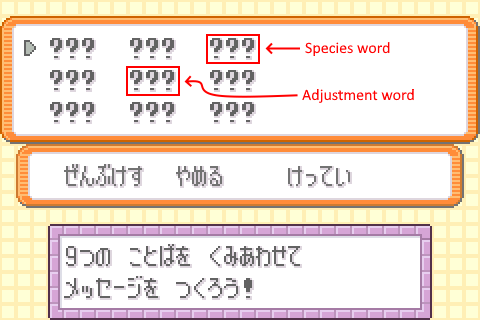
Note that since ニドくん obtained via the in-game trade has a personality value (PID) of 0x4C970B9E and a Trainer ID of 63184, it can be used as a material Pokémon by adjusting its experience to a different value.
Step 2: Mail Glitch
Prepare the following 3 Pokémon in your party, with the first 2 slots being Pokémon 1 and 2 below.
- Any Pokémon holding a consumable item.
- A Pokémon that knows Knock Off.
- A Pokémon that knows Recycle and is holding Mail (the message can be anything).
Start a Double Battle. It is recommended to save before starting. In the Double Battle, perform the following steps:
- Have the Pokémon use (consume) the consumable item.
- Once the item has been consumed, switch that Pokémon out for the Pokémon that knows Recycle and is holding Mail.
- Use Knock Off on the Recycle-user holding Mail to knock off its Mail.
- Use Recycle to recover the consumed item.
- End the battle.
Check your party. If the Pokémon that knows Recycle is no longer holding Mail, the Mail Glitch succeeded. Give the Recycle-user Mail again.
Step 3: Obtain the Glitch Pokémon
Place the material Pokémon obtained in Step 1 as the 1st Pokémon in Box 3, and fill your party with 6 Pokémon.
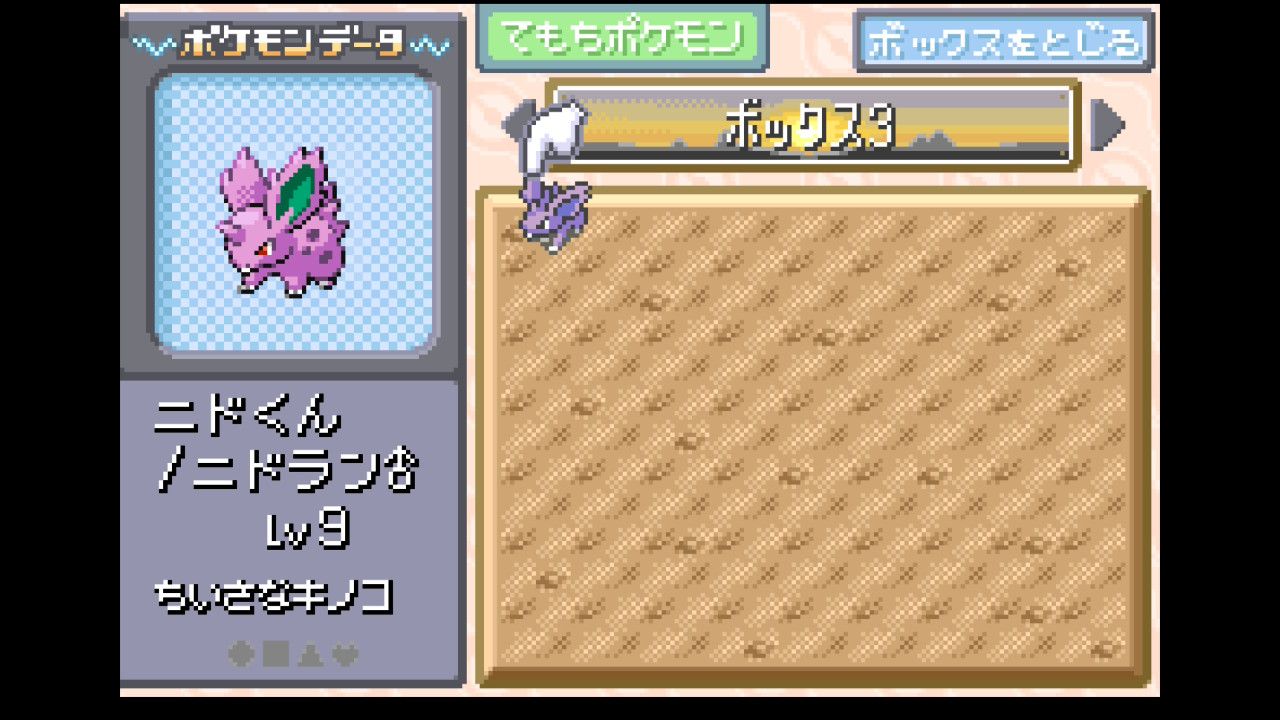
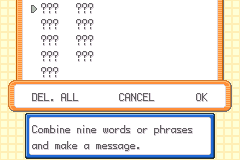
Give Mail to all 6 Pokémon (the message can be anything). When you attempt to give Mail to the 6th Pokémon, a Mail screen with ??? entered will be displayed.
If you are using LeafGreen and the material Pokémon is ニドくん, set the 3rd and 5th lines of the Mail to the following. The _____ entries in the table mean to delete the ????? word.
| Experience | 3rd line | 5th line |
|---|---|---|
| 466 | ポケモンゲット | _____ |
| 488 | レッド | _____ |
| 493 | レベル | _____ |
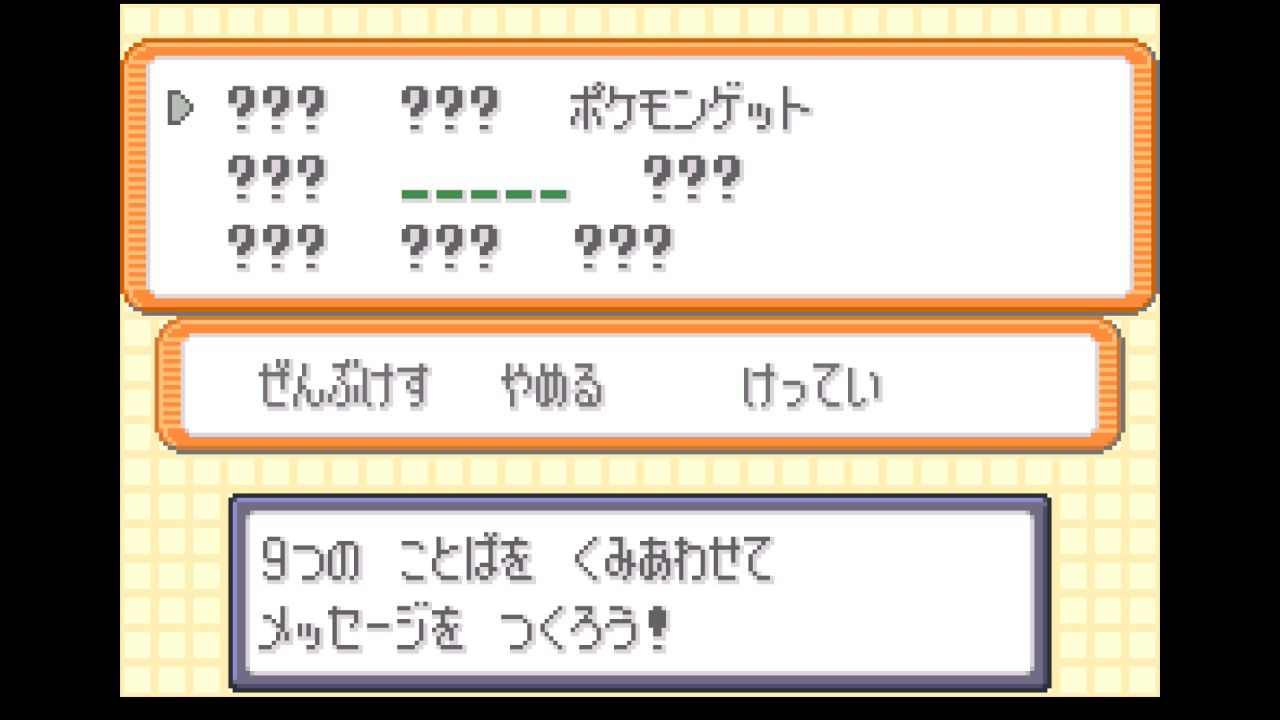
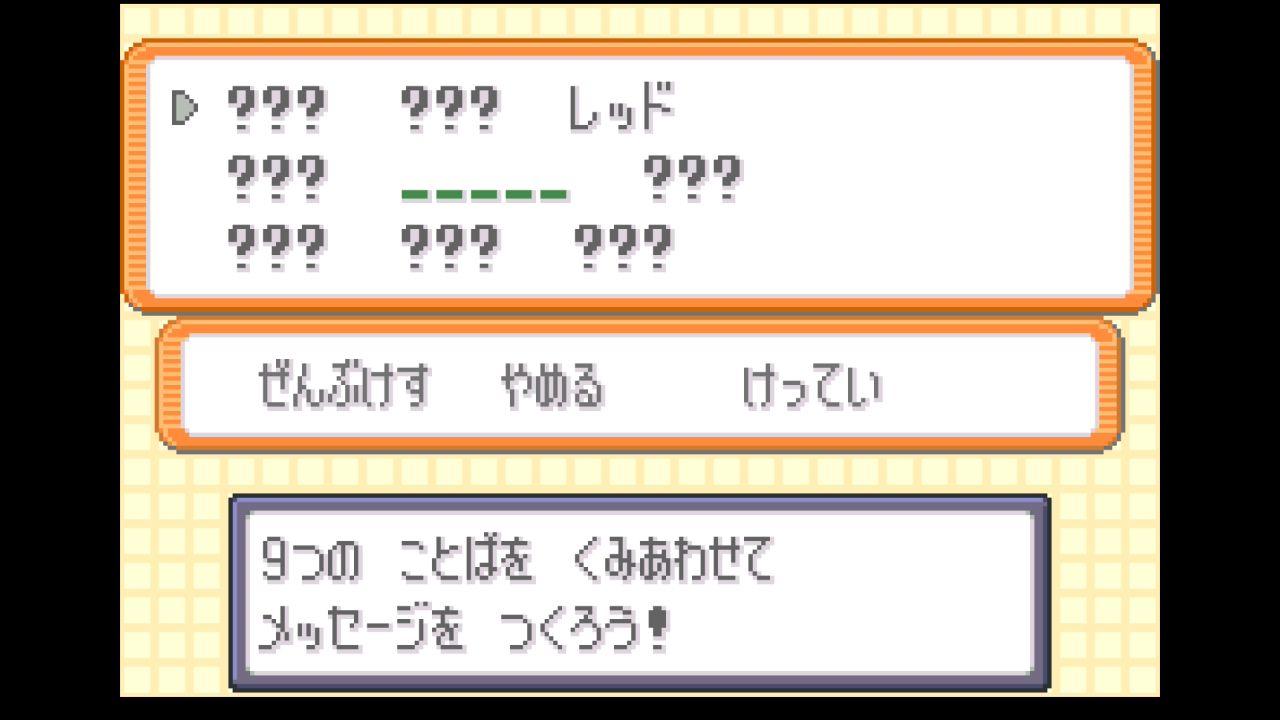
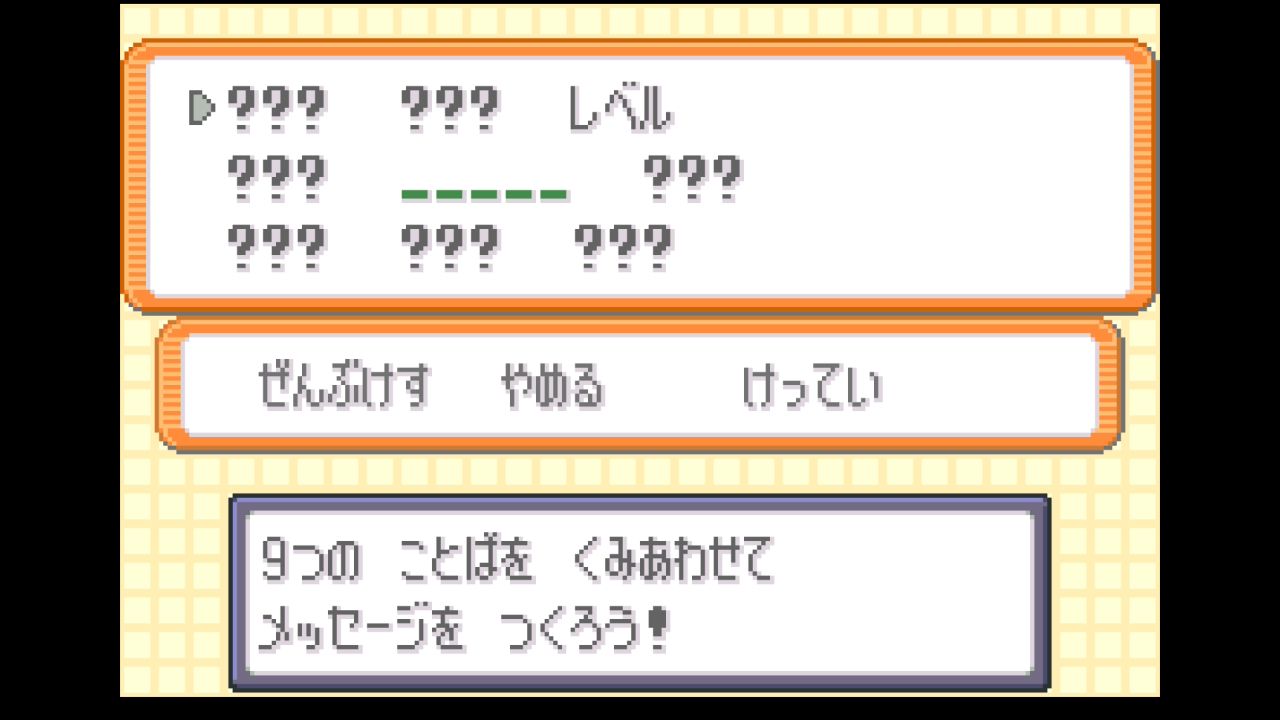
If you are using FireRed or a different material Pokémon, please use Detelony's FRLG ACE Glitch Pokémon Generation Calculator, or final's Species Word Finder and Checksum Adjustment Calculator.

Step 4: Enter the Hall of Fame
Do not deposit any Pokémon in Boxes 12 through 14, and keep your party at 4 or fewer Pokémon. If your party has 5 or more Pokémon, the game will freeze partway through the Hall of Fame sequence.
Set the box names according to the version of the game you are using and the species ID of the Glitch Pokémon. Click the triangle below to display the table, check the type corresponding to your Glitch Pokémon's species ID, and set the box names for that type. If you used ニドくん with experience 466, 488, or 493 as the Glitch Pokémon, use ARM-2 type.
FireRed Species IDs
| Species ID | Type |
|---|---|
| 0x03F8 | ARM-2 |
| 0x060C | ARM-2 |
| 0x15BC | ARM-0 |
| 0x1626 | ARM-0 |
| 0x4312 | Thumb |
| 0x4317 | Thumb |
| 0x4D12 | ARM-0 |
| 0x7912 | Thumb |
| 0x89FA | Thumb |
| 0xA253 | Thumb |
| 0xB2A9 | ARM-0 |
| 0xC7FE | Thumb |
| 0xC950 | ARM-0 |
| 0xCAA2 | ARM-2 |
| 0xCD48 | Thumb |
| 0xCF8B | Thumb |
| 0xD624 | Thumb |
| 0xDD37 | Thumb |
| 0xE07C | Thumb |
| 0xE472 | ARM-0 |
| 0xE69D | ARM-0 |
| 0xFF3B | ARM-2 |
| 0xFF41 | ARM-2 |
| 0xFF61 | ARM-2 |
| 0xFF6B | Thumb |
| 0xFF78 | ARM-0 |
| 0xFF79 | Thumb |
| 0xFF7B | Thumb |
| 0xFF7E | Thumb |
| 0xFF81 | Thumb |
| 0xFF83 | Thumb |
| 0xFF86 | Thumb |
| 0xFF8B | Thumb |
| 0xFF8E | Thumb |
| 0xFF96 | Thumb |
| 0xFF99 | Thumb |
| 0xFF9B | Thumb |
| 0xFF9E | Thumb |
| 0xFFA1 | Thumb |
| 0xFFA3 | Thumb |
| 0xFFAB | Thumb |
| 0xFFAE | Thumb |
| 0xFFB1 | Thumb |
| 0xFFB3 | Thumb |
| 0xFFB6 | Thumb |
| 0xFFB9 | Thumb |
| 0xFFBB | Thumb |
| 0xFFC3 | Thumb |
| 0xFFC6 | Thumb |
| 0xFFC9 | Thumb |
| 0xFFCE | Thumb |
| 0xFFD3 | Thumb |
| 0xFFF8 | ARM-0 |
| 0xFFF9 | Thumb |
LeafGreen Species IDs
| Species ID | Type |
|---|---|
| 0x03F8 | ARM-2 |
| 0x060C | ARM-2 |
| 0x15BC | ARM-0 |
| 0x1626 | ARM-0 |
| 0x3D88 | ARM-2 |
| 0x4D1B | Thumb |
| 0xBCB2 | Thumb |
| 0xC290 | Thumb |
| 0xC6AA | ARM-2 |
| 0xCFAD | ARM-2 |
| 0xD45D | ARM-2 |
| 0xD628 | Thumb |
| 0xEA20 | ARM-0 |
| 0xEB51 | Thumb |
| 0xFBED | ARM-0 |
| 0xFF11 | ARM-2 |
| 0xFF37 | ARM-2 |
| 0xFF41 | ARM-2 |
| 0xFF57 | ARM-2 |
| 0xFF5C | ARM-2 |
| 0xFF61 | ARM-2 |
| 0xFF6C | Thumb |
| 0xFF79 | Thumb |
| 0xFF7C | Thumb |
| 0xFF7F | Thumb |
| 0xFF81 | Thumb |
| 0xFF84 | Thumb |
| 0xFF87 | Thumb |
| 0xFF8C | Thumb |
| 0xFF8F | Thumb |
| 0xFF97 | Thumb |
| 0xFF99 | Thumb |
| 0xFF9C | Thumb |
| 0xFF9F | Thumb |
| 0xFFA1 | Thumb |
| 0xFFA4 | Thumb |
| 0xFFAC | Thumb |
| 0xFFAF | Thumb |
| 0xFFB1 | Thumb |
| 0xFFB4 | Thumb |
| 0xFFB7 | Thumb |
| 0xFFB9 | Thumb |
| 0xFFBC | Thumb |
| 0xFFC4 | Thumb |
| 0xFFC7 | Thumb |
| 0xFFC9 | Thumb |
| 0xFFCE | ARM-0 |
| 0xFFD1 | Thumb |
| 0xFFF9 | Thumb |
Depending on the type, use one of the following:
ARM-0
Box 1: [ア]
Box 2: [     まqた]
Box 3: [ぁm〇〇しく]
ARM-2
Box 1: [ア]
Box 2: [     まqた]
Box 3: [ぁmしく〇〇]
Thumb
Box 1: [ ぶ び〇〇しく] Replace 〇〇 with the following value based on your version:
| Version | 〇〇 |
|---|---|
| GBA FireRed v1.0 | 『」 |
| GBA FireRed v1.1 | す♂ |
| Switch FireRed | 『y |
| GBA LeafGreen v1.0 | ュ」 |
| GBA LeafGreen v1.1 | m」 |
| Switch LeafGreen | ュy |
Note that for the ARM-0 and ARM-2 types on the Switch version, the default Box 1 name ボックス1 is also acceptable.
With no Pokémon deposited in Boxes 12 through 14, open the "Move Pokémon" menu, pick up any Pokémon, move it onto the Glitch Pokémon, and swap them. This will trigger the Hall of Fame.
Note that the Glitch Pokémon will disappear after the Hall of Fame sequence.
Code
Only the GBA FireRed v1.0 version is described here. The code executes the Hall of Fame function at address 0x080CB4B0 as a Thumb instruction.
ARM-0
02031618 <.data>:
 2031618:	e51f0000 	ldr	r0, [pc, #-0]	@ 0x2031620
 203161c:	e12fff10 	bx	r0
 2031620:	080cb4b1 	stmdaeq	ip, {r0, r4, r5, r7, sl, ip, sp, pc}
Binary
00 00 1F E5 10 FF 2F E1 B1 B4 0C 08Thumb
0203160c <.data>:
 203160c:	4800      	ldr	r0, [pc, #0]	@ (0x2031610)
 203160e:	4700      	bx	r0
 2031610:	b4b1      	push	{r0, r4, r5, r7}
 2031612:	080c      	lsrs	r4, r1, #32
Binary
00 48 00 47 B1 B4 0C 08Acknowledgments
Thanks to Bonjiri for identifying the Hall of Fame function address for the Switch version.
References
In addition to the resources mentioned in Step 1, the following are referenced.