
This is a translation of the original article:
📄  ポケットモンスター エメラルド 殿堂入り(任意コード実行)
It was entirely processed by Claude Opus 5.5 in Claude Code with the Notion MCP.
This article explains how to reach the Hall of Fame in Pokémon Emerald using arbitrary code execution. It can be used in the Any% No Save Corruption speedrun category, where the goal is to reach the Hall of Fame as quickly as possible with glitches allowed (but resets during saving disallowed).
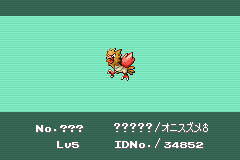
Hall of Fame Procedure
Environment
This guide only works with the Japanese version of Pokémon Emerald. It does not work with any non-Japanese version.
Preparation
- A Pomeg Berry (ザロクのみ)
- Can be obtained around the Berry Master's house on Route 123.
Step 1: Prepare the Material Pokémon
The easiest way to obtain a material Pokémon is to use the Seedot (タネボー) named セブン, obtainable by trading a Ralts (ラルトス) in Rustboro City, with its EVs adjusted to 21 HP and 6 Attack. If セブン has not been trained yet, you can adjust it with the following steps. When defeating Pokémon, make sure セブン participates in the battle.
- Use 2 HP Ups.
- Defeat 1 Wurmple (ケムッソ).
- Defeat 6 Poochyena (ポチエナ).
Be careful not to gain EVs from Pokérus or other battles. Do not feed セブン any Pokéblocks (ポロック), and do not use a Pomeg Berry (ザロクのみ) on it.
Preparing the Material with RNG Manipulation
Instead of セブン, you can also use a normal wild Pokémon with a personality value (PID) that satisfies the following conditions.
(PID & 0x40000000) == 0
PID mod 24 is one of 0, 1, 2, 3, 6, 7, 12, 13
Bit 30 being 0 means that the first digit of the 8-digit hexadecimal PID is one of 0, 1, 2, 3, 8, 9, A, or B. This cannot be determined from the nature alone, so check the PID with an RNG tool or similar.
After catching it, set its HP EVs to 21 and its Attack EVs to 6. Defense, Sp. Atk, and Sp. Def EVs are arbitrary. However, be careful of the total EV limit.
If only bit 30 of the PID changes from 0 to 1 and no other data changes, the checksum matches when an even number (0, 2, or 4) of the items in the following table apply. This assumes a Pokémon with a normal held item, moves, and experience, and with the Egg flag and the relevant bits of the unused area set to 0.
| Item | Counted when (value just before corruption) |
|---|---|
| Speed EVs | 64–127 or 192–255 |
| Beauty (うつくしさ) | 64–127 or 192–255 |
| Sheen (けづや) | 64–127 or 192–255 |
| Current PP of the 4th move | 64–127 or 192–255 |
| Ball caught in | Nest (ネスト), Repeat (リピート), Timer (タイマー), Luxury (ゴージャス), or Premier (プレミア) |
For example, if you catch it in a Poké Ball (モンスターボール), do not feed it Pokéblocks (ポロック), keep its Speed EVs at 0–63 or 128–191, and keep the current PP of its 4th move at 0–63, then 0 items apply. If it knows 3 or fewer moves, the current PP of the 4th move is normally 0. Under the same conditions with a Premier Ball (プレミアボール), setting the Speed EVs to 64–127 or 192–255 makes 2 items apply.
Pokémon that have been fed Pokéblocks (ポロック) can also be judged with the conditions in the table. Whether it has a normal held item does not affect this checksum condition.
The original Smart (かしこさ) value is treated as the remaining hatch counter. For a wild Pokémon that has not been fed Pokéblocks (ポロック), it is 0, so the Egg will hatch at the next hatch check. Do not add the resulting Egg to your party until you have set the box names.
Step 2: Obtain the Glitch Pokémon
The following steps use one material Pokémon.
Preparing Your Party and Boxes
Empty Boxes 1, 2, and 12 through 14, and make your party the following 3 Pokémon. The order does not matter, but the 3rd Pokémon must be able to battle.
- A Pokémon whose max HP decreases when a Pomeg Berry (ザロクのみ) is used on it
- To check whether its max HP decreases, save beforehand, use a Pomeg Berry (ザロクのみ), check the result, and then reset.
- A fainted Pokémon
- Any Pokémon (the material Pokémon is fine)
Adjust the current HP of the Pokémon you will use the Pomeg Berry (ザロクのみ) on to 1. One way to do this is to walk around while it is poisoned and use an Antidote (どくけし) once its HP reaches 1. Do not restore its HP after adjusting it.
It is recommended to save before starting the battle so that you can retry if something goes wrong.
Battle and Party Arrangement
- In a battle with a wild Pokémon, send out the 3rd Pokémon in your party and run away without defeating the opponent. If the 3rd Pokémon faints, start over.
- Open the PC and place the material Pokémon in the 24th slot of Box 2.
- Deposit every Pokémon except the one for the Pomeg Berry (ザロクのみ) and the fainted one into Boxes 3 through 11, leaving 2 Pokémon in your party. Do not withdraw any other Pokémon.
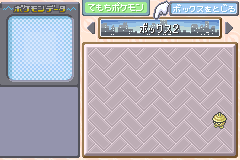
Make sure Box 1 is empty and Box 2 contains only the material Pokémon. Do not fight any other battle from here until the battle in "Pomeg Glitch".
Pomeg Glitch
- Close the PC and use the Pomeg Berry (ザロクのみ) on the Pokémon with 1 HP. It will either faint or have an abnormally large HP value. If the HP becomes abnormal, use a Potion (キズぐすり) to bring it to 0 HP. If the HP stays at 1, reset and start over from your save.
- With every Pokémon in your party at 0 HP, start a battle with a wild Pokémon. A Pokémon that looks like "?" appears.
- Open the SUMMARY (つよさをみる) of the 2nd Pokémon from "POKéMON". Press B to go back, then press B again to close the selection menu.
- With the cursor on the 2nd Pokémon, press Up 3 times (1st Pokémon → CANCEL → out of range). Press it one at a time instead of holding it.
- Press B to return to the battle screen and run away. You may be treated as having blacked out and be sent back to a Pokémon Center.
Checking for Success
Check the 24th slot of Box 2. If you prepared the material Pokémon as in Step 1, the signs of success are as follows:
- It has become an "Egg" (タマゴ), not a "Bad Egg" (ダメタマゴ).
- It is in a Nest Ball (ネストボール).
- Its description says that it will hatch soon.
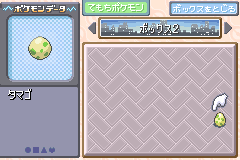
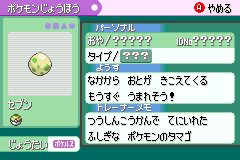
The success rate of this method is 1/32 (about 3.1%).
If it becomes a Bad Egg, the material Pokémon is broken, so reset without saving and start over from your save. If nothing changed, every Pokémon in your party is still at 0 HP, so you can repeat from step 2 of "Pomeg Glitch".
It is recommended to save once you succeed. Even if you make a mistake when entering the box names, you can retry from the state with the Egg. Leave the Egg in the box and proceed to Step 3.
Step 3: Enter the Hall of Fame
Do not deposit any Pokémon in Boxes 12 through 14, and keep your party at 4 or fewer Pokémon. If your party has 5 or more Pokémon, the game will freeze partway through the Hall of Fame sequence. Set the names of Boxes 1 through 3 as follows.
Box 1: [ア]
Box 2: [     まqた]
Box 3: [ぁmてく4ラ]
Add the Egg prepared in Step 2 to your party and walk until it hatches. This triggers the Hall of Fame. The Hall of Fame record is updated and the game is saved.
Bonus: Display THE END Directly
You can also use the Egg prepared in Step 2 to display THE END screen directly. Hatching the Egg in Step 3 makes it unusable, so do this before hatching it.
Do not deposit any Pokémon in Boxes 12 through 14, and set the names of Boxes 1 through 5 as follows.
Box 1: [あうッoせタポq]
Box 2: [た pあlぽnに]
Box 3: [ぁmデぅズばおO]
Box 4: [りゆコぬく l ]
Box 5: [キタビタFょぃび]
Add the Egg to your party and walk until it hatches. This displays THE END.
Note that this method only displays THE END screen. It does not update the Hall of Fame record or the game-clear state. The credits do not play and the game is not saved, so you need to reset after the screen is displayed.
Code
The 0x0615 Egg and the Execution Entry Point
When the intended PID corruption occurs, the HP and Attack EVs are read as the species ID. The bytes for 21 HP and 6 Attack are 15 06, so the species becomes 0x0615.
The hatching animation of this Egg refers to out-of-range data and branches to 0x0206FEFE. Depending on the layout in RAM, execution starts around the 9th to 11th slots of Box 12. If Boxes 12 through 14 are empty, execution passes through the empty area to the box names in any layout and runs the box names as ARM instructions. These names are not compatible with the ones for 0x085F.
Program That Runs the Hall of Fame
The program in the box names hands control to the game's Hall of Fame start function at 0x081377A4. Because this function is written in Thumb instructions, the value used for the branch is 0x081377A5, with the lowest bit set to 1.
The following is the part of the box names that branches to the function. The position of the LDR, 12 bytes after the start of Box 1's name, is 0000, and the hexadecimal offset from there is shown on the left.
0000: e51f0000  ldr r0, [pc, #-0]  ; reads with offset 000A specified
0004: e12fff10  bx  r0             ; branch to 081377A4 in Thumb
0008: 77a50813  .word 0x77a50813   ; constant adjusted for the 2-byte offset
When an ARM instruction reads PC, it points 8 bytes ahead of the executing instruction. However, at the 0x0615 entry point, a 2-byte offset remains in the PC at runtime, so the read address specified by LDR also shifts from 0x0008 to 0x000A. This 32-bit read returns the value at the 4-byte boundary rotated by 16 bits. By setting the constant to 0x77A50813 in advance, r0 receives 0x081377A5. The last 4 bytes are data representing the branch target and are not executed as instructions at that location.
Also, BX itself does not modify the return address in LR. The Hall of Fame start function returns 0 to the original caller after processing, and the rest of the Hall of Fame sequence proceeds through the registered callback2.
Binary
00 00 1F E5 10 FF 2F E1 13 08 A5 77 The box names as a whole are the following 27 bytes. Each row is the 9 bytes of one box. FF is the name terminator, and the rest of a short name is also FF. The spaces at the start of Box 2's name become 00.
51 FF FF FF FF FF FF FF FF
00 00 00 00 00 1F E5 10 FF
2F E1 13 08 A5 77 FF FF FF
Program That Displays THE END
The program first forces a blank screen, then initializes the screen and graphics with the game's initialization function at 0x08175A24. After clearing the fade, it calls the THE END drawing function at 0x08175AE4. Both functions are written in Thumb instructions, so the program branches to addresses with the lowest bit set to 1. After drawing, a wait loop in ROM keeps the screen displayed.
The start of Box 1's name is 0000, and the hexadecimal offset from there is shown on the left.
; ARM instructions
0000: e3a00301  mov   r0, #0x04000000    ; r0 = address of DISPCNT
0004: e59f600e  ldr   r6, [pc, #14]      ; read the value 08175A25 at offset 001C
0008: e40010ff  str   r1, [r0], #-255    ; write r1=0206FEFE to force blank; low 8 bits of r0 become 1
000C: e24fe001  sub   lr, pc, #1         ; set the return address to offset 0014 (Thumb)
0010: e12fff16  bx    r6                 ; to the initialization function 08175A24
; Thumb instructions
0014: 3194      adds  r1, #0x94          ; r1 = wait loop in ROM
0016: 468e      mov   lr, r1             ; use it as the drawing function's return address
0018: c905      ldmia r1!, {r0, r2}      ; r2 = address of the fade state
001A: 28ff      cmp   r0, #255           ; no effect on processing
001C: 5a25      ldrh  r5, [r4, r0]       ; no effect on processing (doubles as the constant read by LDR)
001E: 0817      lsrs  r7, r2, #32        ; r7 = 0
0020: e000      b     0024
0022: ff00      .hword 0xff00            ; not executed
0024: 6057      str   r7, [r2, #4]       ; clear the fade
0026: 6097      str   r7, [r2, #8]
0028: 36c0      adds  r6, #0xc0          ; r6 = 08175AE5
002A: 4730      bx    r6                 ; to the drawing function 08175AE4
002C: ff        .byte 0xff               ; terminator of Box 5's name
As with the Hall of Fame program, a 2-byte offset remains in the PC at runtime. Therefore, the LDR at offset 0004 reads 0x001C, and the SUB at offset 000C sets LR to 0x0015. Because the lowest bit of LR is 1, the initialization function returns to offset 0014 as Thumb instructions.
The argument of the initialization function is the low 8 bits of r0, which become 1 through the post-decrement of STR. The 4 bytes at offset 001C are both the constant 0x08175A25 read by LDR and Thumb instructions that are executed.
Binary
The box names as a whole are the following 45 bytes. Each row is the 9 bytes of one box.
01 03 A0 E3 0E 60 9F E5 FF
10 00 E4 01 E0 4F E2 16 FF
2F E1 94 31 8E 46 05 C9 FF
28 25 5A 17 08 00 E0 00 FF
57 60 97 60 C0 36 30 47 FF
