
This is a translation of the original article:
📄 ポケットモンスター ピカチュウ バイナリエディタ サファリゾーン脱出バグ
The RAM Writer is the ultimate arbitrary code execution tool for first-generation Pokémon games. With this editor, you can read and write any value to any memory address. You can even write and execute entire programs, making it a potent tool that even allows you to play games like Tetris and Reversi.
RAM Writer Installation Procedure
Environment
This guide only works with the Japanese version of Pokémon Yellow. It does not work with Pokémon Red, Green, Blue, or non-Japanese versions. Since it supports existing save data, you can introduce it without starting a new game. For methods to start a new game or introduce RAM Writer in Pokémon Red, Green, and Blue, please refer to the following articles.
- 📄RAM Writer in Pokémon Yellow (JP)
- 📄RAM Writer in Pokémon Yellow No Save Corruption (JP)
- 📄RAM Writer in Pokémon Red/Green/Blue (JP)
Version Differences
Pokémon Yellow has four versions: v1.0, v1.1, v1.2, and v1.3. You can determine which version you have by examining the engraving on the lower right corner of the cartridge's package seal:
- Numbers only or numbers + A = v1.0.
- Numbers + B = v1.1.
- Numbers + C = v1.2.
- Numbers + D = v1.3.
Note that the 3DS Virtual Console uses v1.3.
Preparation
- Make the 9th item "どくけし (Antidote) x91" and the 10th item "どくけし (Antidote) x96".
- It is good to adjust this by buying two どくけし (Antidote) x99 and then tossing items.
- Pokémon in your party
- A Pokémon that has Cut (requires Cascade Badge).
- A Pokémon that has Fly or Teleport (Fly requires Thunder Badge).
- A Pokémon that has Surf (requires Soul Badge).
Optional
- It's good to have a Bicycle to rack up steps.
- It's good to have Repels to avoid encounters.
- Although Teleport can be used as a substitute, it is good if Fly can be used. Also, if you can move to Cinnabar Island with Fly, movement in step 1 of 5 will be easier.
Step 1: Safari Zone Escape Glitch
- Enter the Safari Zone.
- Return to the reception once and when asked "もう おわりに する?", select "いいえ (No)".
- Save and reset.
- Return to the reception and keep moving down to exit through the bottom exit. When asked if you want to play the Safari Game, select "いいえ (No)".
- Move to Route 20.
- Keep moving to trigger an announcement on Route 20.
- Move to the Safari Zone reception. Exit through the bottom exit of the reception. You will move to a Glitch city.
Step 2: Navigating the Glitch City
- Move 1 step down, then 7 steps left.
- Press the Up button to look upwards.
- Open and close the Start Menu.
- Open the Start Menu again, and a water tile will appear, so use Surf.
- Move 6 steps up, then 1 step left.
- Open and close the Start Menu.
- Press the Right button to look right.
- Open the Start Menu again, and a Cut tree will appear in front of you.
Step 3: Obtaining an x0 item
The Cut tree that appears in Step 2 corresponds to the quantity of the 10th item. By using Cut, you can change the quantity of どくけし (Antidote) from 96 to 110.
Repeat the following actions:
- Use Cut on the tree in front of you to change the quantity of the 10th item to 110.
- Select the 9th item, then select the 10th item.
- The quantity of the 10th item will become 99, so toss 3 to make it 96.
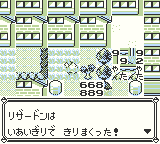
Repeat these actions until you obtain どくけし (Antidote) x0. Once you have どくけし (Antidote) x0, use Teleport or Fly to move to a Pokémon Center at any location.
Step 4: Item Manipulation
- Set the 1st and 2nd items in your bag that can be tossed, make the 3rd item どくけし (Antidote) x0, and deposit all other items. For v1.1-v1.3 (VC), it is recommended to set the 1st through 11th items in PC storage to unnecessary items.
- Toss 1 どくけし from the 3rd item to make it どくけし (Antidote) x255.
- Toss the 1st and 2nd items. The 1st to 3rd items will become どくけし (Antidote) x255.
- Toss 253 どくけし (Antidotes) from the 1st item.
- Swap the 1st どくけし (Antidote) and 2nd どくけし (Antidote) twice.
By performing these operations, the number of items you hold will become 255, allowing you to move the cursor below "やめる" (Cancel).
Step 5: Install Simplified RAM Writer
Open the settings and set them as follows:
せんとうアニメ:じっくりみる (Battle animations: On)
しあいのルール:かちぬきタイプ (Battle style: Set)
サウンド:イヤホン2 (Sound: Head phone 2)
This will make the かいがらバッヂ appear as the 26th item.
By leaving a Pokémon named "ゅゆてっん" at the Day Care and setting the species and nicknames of the Pokémon deposited in the PC box as follows, you can activate the simple RAM Writer by using the かいがらバッヂ. Do not deposit more than 23 Pokémon in the PC box.
| No. | Species | Nickname |
|---|---|---|
| 1 | Pidgey or Rattata | がんぜルョ |
| 2 | Pidgey or Rattata | よヂづよく |
| 3 | Pidgey or Rattata | づひせひる |
| 4 | Pidgey or Rattata | なゅダだグ |
| 5 | Pidgey or Rattata | ぼヂてソん |
| 6 | Pidgey or Rattata | ダだギムツ |
| 7 | Pidgey or Rattata | てソんダム |
| 8 | Pidgey or Rattata | キづごヅー |
| 9 | Pidgey or Rattata | ぱへにんぴ |
| 10 | Pidgey or Rattata | へにんボぷ |
| 11 | Pidgey or Rattata | v1.0: へにんへそ v1.1~v1.3: へにんへた |
| 12 | Pidgey or Rattata | ううゾダグ |
| 13 | Pidgey or Rattata | ダめいんど |
| 14 | Pidgey or Rattata | ダれチんダ |
| 15 | Pidgey or Rattata | めしんざダ |
| 16 | Pidgey or Rattata | れじよダリ |
| 17 | Pidgey or Rattata | だいぽギて |
| 18 | Tentacool | へへんひぢ |
| 19 | Victreebel | ぼダモよザ |
| 20 | (Any Poké) | れわんよメ |
| 21 | (Any Poké) | ボデのだエ |
If you are having trouble with the Japanese input method, please refer to the following page.
Simplified RAM Writer
From now on, using the かいがらバッヂ should start the simplified RAM Writer each time.
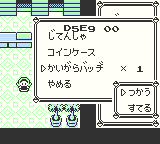
D5E9 on the left is the memory address you are trying to write to, and 00 on the right is the current value at that address.
B: Address -01
A: Address +01
↑: Value -01
↓: Value +01
←: Value -10
→: Value +10
START: Exit
SELECT: Execute code from D62C (be careful not to press this until you have entered the program)
Step 6: Install the RAM Writer
Use the simplified RAM Writer to input the RAM Writer program. When you are finished inputting, press the Select button to start the RAM Writer. It is recommended that you close the simplified RAM Writer and save the game before starting the full RAM Writer.
| Address | Value |
|---|---|
| D5E9 | CD |
| D5EA | v1.0: 3F v1.1-v1.3 (VC): 40 |
| D5EB | 38 |
| D5EC | F0 |
| D5ED | B3 |
| D5EE | 01 |
| D5EF | 01 |
| D5F0 | 00 |
| D5F1 | 07 |
| D5F2 | 38 |
| D5F3 | 18 |
| D5F4 | 0B |
| D5F5 | 0B |
| D5F6 | 07 |
| D5F7 | 38 |
| D5F8 | 13 |
| D5F9 | 0E |
| D5FA | F0 |
| D5FB | 07 |
| D5FC | 38 |
| D5FD | 0E |
| D5FE | 01 |
| D5FF | 10 |
| D600 | 00 |
| D601 | 07 |
| D602 | 38 |
| D603 | 08 |
| D604 | 07 |
| D605 | 38 |
| D606 | 03 |
| D607 | 07 |
| D608 | D0 |
| D609 | E9 |
| D60A | E1 |
| D60B | C9 |
| D60C | 79 |
| D60D | CB |
| D60E | 43 |
| D60F | 20 |
| D610 | 06 |
| D611 | CB |
| D612 | 4B |
| D613 | 20 |
| D614 | 05 |
| D615 | 09 |
| D616 | C9 |
| D617 | 86 |
| D618 | 77 |
| D619 | C9 |
| D61A | 84 |
| D61B | 67 |
| D61C | C9 |
| D61D | F5 |
| D61E | CB |
| D61F | 37 |
| D620 | CD |
| D621 | 24 |
| D622 | D6 |
| D623 | F1 |
| D624 | E6 |
| D625 | 0F |
| D626 | C6 |
| D627 | F6 |
| D628 | F6 |
| D629 | 60 |
| D62A | 22 |
| D62B | C9 |
| D62C | 21 |
| D62D | 00 |
| D62E | D0 |
| D62F | CD |
| D630 | E9 |
| D631 | D5 |
| D632 | E5 |
| D633 | 11 |
| D634 | F8 |
| D635 | FF |
| D636 | 19 |
| D637 | E5 |
| D638 | D1 |
| D639 | 21 |
| D63A | AB |
| D63B | C3 |
| D63C | 01 |
| D63D | 0C |
| D63E | 00 |
| D63F | 36 |
| D640 | 7C |
| D641 | 23 |
| D642 | 7A |
| D643 | CD |
| D644 | 1D |
| D645 | D6 |
| D646 | 7B |
| D647 | CD |
| D648 | 1D |
| D649 | D6 |
| D64A | 36 |
| D64B | 7F |
| D64C | 23 |
| D64D | 1A |
| D64E | CD |
| D64F | 1D |
| D650 | D6 |
| D651 | 13 |
| D652 | 36 |
| D653 | 7C |
| D654 | 09 |
| D655 | 7C |
| D656 | FE |
| D657 | C5 |
| D658 | 20 |
| D659 | E5 |
| D65A | 3E |
| D65B | ED |
| D65C | EA |
| D65D | 4B |
| D65E | C4 |
| D65F | E1 |
| D660 | 18 |
| D661 | CD |
RAM Writer
From now on, starting the simplified RAM Writer and pressing the Select button should start the RAM Writer each time.
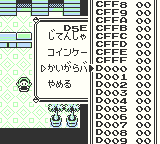
↑: Address -01
↓: Address +01
←: Address -10
→: Address +10
B+↑: Address -100
B+↓: Address +100
B+←: Address -1000
B+→: Address +1000
A+↑: Value -01
A+↓: Value +01
A+←: Value -10
A+→: Value +10
START: Exit
SELECT: Execute code from the current address (use with caution)
By rewriting the value of D2A2 to 65 with a RAM Writer, you can make the 1st item in your bag はやぶさバッヂ. Furthermore, if you activate the RAM Writer with かいがらバッヂ and use the RAM Writer to rewrite as follows, you will be able to activate the RAM Writer using はやぶさバッヂ directly. Once you can activate the RAM Writer with はやぶさバッヂ, then
かいがらバッヂ will no longer be necessary.
v1.0
| Address | Value |
|---|---|
| DDCA | C3 |
| DDCB | 2C |
| DDCC | D6 |
v1.1-v1.3 (VC)
| Address | Value |
|---|---|
| D4CA | 0E |
| D4CB | 62 |
| D4CC | 04 |
| D4CD | 09 |
| D4CE | E9 |
| D4CF | 63 |
| D4D0 | FF |
While this is not directly related to launching the RAM Writer, it is recommended to modify the PC Item Box from addresses D4B9 to D4C9 as follows. However, please do not withdraw the 1st through 11th items.
0B C9 01 CA 01 CB 01 CC 01 CD 01 CE 01 CF 01 D0 01Step 7: Restore Normal State
Side effects occur in your item bag due to installing the RAM Writer:
By setting the values of addresses D2A1~D2A4 as follows, you can make your item bag contain only はやぶさバッヂ.
01 65 01 FFUsage Guide
Once you have installed a RAM Writer, see the following article to learn how to use it.
📄RAM Writer Usage Guide in Pokémon Red/Green/Blue/Yellow (JP)
Precautions
For v1.0, set the original trainer name of the 5th Pokémon in the PC Box to "がんてじよ" and use the はやぶさバッヂ. Be especially careful, as switching PC Boxes will change the Pokémon in the PC Box. If you have followed the above steps and can directly start the RAM Writer from the はやぶさバッヂ, the original trainer name of the 5th Pokémon in the PC Box should be "がんてじよ".
For v1.1-v1.3 (VC), the reader should never change the contents of the 9th, 10th, and 11th PC items. If you have followed the above steps and can start the RAM Writer directly from the はやぶさバッヂ, the 9th to 11th items stored in the PC should be as follows:
10th item: モンスターボール (Poké Ball) × 9
11th item: わざマシン33 (TM33)
Regardless of the version, do not edit addresses D5E9-D661 with the RAM Writer.
Technical Appendix
Safari Zone Escape Glitch
The Safari Zone Escape Glitch is a bug where the remaining steps in the Safari Zone become 0 while outside the Safari Zone, and you are called back to the reception. By entering the Safari Zone, the flag for being in the Safari Zone is set, and 500 remaining steps are set. By exiting the Safari Zone while these flags remain, you can be called back to the reception outside the Safari Zone.
The reason you can exit the Safari Zone without properly ending it in steps 1 of 2-4 is that the Safari Zone reception script is reset.
Mechanism of Item Quantity Increase by using Cut
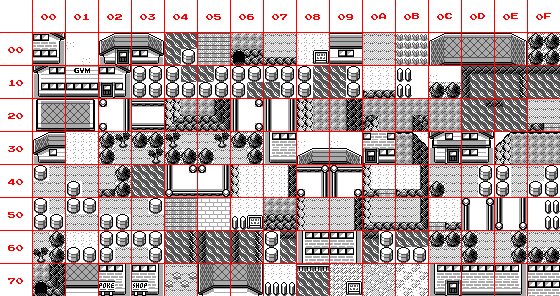
A 2x2 area of four squares is treated as a single block, and each block is assigned one of the following IDs. In Step 3, using Cut on the tree changes the value of address D2B5 from 60 to 6E. Address D2B5 stores the quantity of the 10th item, and this change in value causes the quantity to change from 96 to 110.
Effect of かいがらバッヂ
Using かいがらバッヂ jumps to address D9B2. Address D9B2 stores the number of Pokémon deposited in the PC box. Addresses D9B3 onwards store the species of Pokémon deposited in the PC box.
By making addresses D9B2 to D9C3 harmless instructions and addresses D9C4 onwards 18 BE, you can execute address D984 when using かいがらバッヂ. The Pokémon species corresponding to 18 is Tentacool, and the Pokémon corresponding to BE is Victreebel. Addresses D984 onwards store the nicknames of the Pokémon deposited at the Day Care.
Simple RAM Writer
Explanation
The simple RAM Writer is a program that outputs the address pointed to by the hl register and its value. It is designed to change the address pointed to by the hl register and its value with key input.
The value of address DEA4 is BF for v1.0, and C0 for v1.1~v1.3(VC).
WRA1:D984 01 E1 D5         ld   bc,D5E1
WRA1:D987 C3 DF DE         jp   DEDF

WRA1:D9B2 16 A5            ld   d,A5
WRA1:D9B4 A5               and  l
WRA1:D9B5 A5               and  l
WRA1:D9B6 A5               and  l
WRA1:D9B7 A5               and  l
WRA1:D9B8 A5               and  l
WRA1:D9B9 A5               and  l
WRA1:D9BA A5               and  l
WRA1:D9BB A5               and  l
WRA1:D9BC A5               and  l
WRA1:D9BD A5               and  l
WRA1:D9BE A5               and  l
WRA1:D9BF A5               and  l
WRA1:D9C0 A5               and  l
WRA1:D9C1 A5               and  l
WRA1:D9C2 A5               and  l
WRA1:D9C3 A5               and  l
WRA1:D9C4 18 BE            jr   D984

WRA1:DE64 26 DE            ld   h,DE
WRA1:DE66 2E A6            ld   l,A6
WRA1:DE68 AF               xor  a
WRA1:DE69 50               ld   d,b
WRA1:DE6A D6 10            sub  a,10
WRA1:DE6C 32               ldd  (hl),a
WRA1:DE6D D6 B8            sub  a,B8
WRA1:DE6F 50               ld   d,b
WRA1:DE70 32               ldd  (hl),a
WRA1:DE71 CB BE            res  7,(hl)
WRA1:DE73 CB D9            set  3,c
WRA1:DE75 50               ld   d,b
WRA1:DE76 C5               push bc
WRA1:DE77 E1               pop  hl
WRA1:DE78 0F               rrca
WRA1:DE79 30 07            jr   nc,DE82
WRA1:DE7B 50               ld   d,b
WRA1:DE7C 3E 10            ld   a,10
WRA1:DE7E C3 8E DE         jp   DE8E
WRA1:DE81 50               ld   d,b
WRA1:DE82 0F               rrca
WRA1:DE83 30 06            jr   nc,DE8B
WRA1:DE85 9F               sbc  a
WRA1:DE86 91               sub  c
WRA1:DE87 50               ld   d,b
WRA1:DE88 C3 8E DE         jp   DE8E
WRA1:DE8B 0F               rrca
WRA1:DE8C 9F               sbc  a
WRA1:DE8D 50               ld   d,b
WRA1:DE8E 86               add  (hl)
WRA1:DE8F 32               ldd  (hl),a
WRA1:DE90 2A               ldi  a,(hl)
WRA1:DE91 11 E3 50         ld   de,50E3
WRA1:DE94 44               ld   b,h
WRA1:DE95 CD C6 DE         call DEC6
WRA1:DE98 45               ld   b,l
WRA1:DE99 50               ld   d,b
WRA1:DE9A CD C6 DE         call DEC6
WRA1:DE9D 1C               inc  e
WRA1:DE9E 46               ld   b,(hl)
WRA1:DE9F 50               ld   d,b
WRA1:DEA0 CD C6 DE         call DEC6
WRA1:DEA3 CD ?? 50         call 50??
WRA1:DEA6 B3               or   e
WRA1:DEA7 B3               or   e
WRA1:DEA8 0E 0F            ld   c,0F
WRA1:DEAA 07               rlca
WRA1:DEAB 50               ld   d,b
WRA1:DEAC 0F               rrca
WRA1:DEAD D2 B2 DE         jp   nc,DEB2
WRA1:DEB0 34               inc  (hl)
WRA1:DEB1 50               ld   d,b
WRA1:DEB2 0F               rrca
WRA1:DEB3 DA 90 DE         jp   c,DE90
WRA1:DEB6 0F               rrca
WRA1:DEB7 50               ld   d,b
WRA1:DEB8 D2 BC DE         jp   nc,DEBC
WRA1:DEBB 2B               dec  hl
WRA1:DEBC 0F               rrca
WRA1:DEBD 50               ld   d,b
WRA1:DEBE DA 2C D6         jp   c,D62C
WRA1:DEC1 0F               rrca
WRA1:DEC2 D8               ret  c
WRA1:DEC3 50               ld   d,b
WRA1:DEC4 30 B2            jr   nc,DE78
WRA1:DEC6 48               ld   c,b
WRA1:DEC7 06 C3            ld   b,C3
WRA1:DEC9 50               ld   d,b
WRA1:DECA CD CD DE         call DECD
WRA1:DECD CB 31            swap c
WRA1:DECF 50               ld   d,b
WRA1:DED0 3E 0F            ld   a,0F
WRA1:DED2 A1               and  c
WRA1:DED3 D6 0A            sub  a,0A
WRA1:DED5 50               ld   d,b
WRA1:DED6 DA DC DE         jp   c,DEDC
WRA1:DED9 D6 A0            sub  a,A0
WRA1:DEDB 50               ld   d,b
WRA1:DEDC 1C               inc  e
WRA1:DEDD 12               ld   (de),a
WRA1:DEDE C9               ret
WRA1:DEDF 30 83            jr   nc,DE64
Binary
D984:
01 E1 D5 C3 DF DE

D9B2:
16 A5 A5 A5 A5 A5 A5 A5 A5 A5 A5 A5 A5 A5 A5 A5 A5 A5 18 BE

DE64:
26 DE 2E A6 AF 50
D6 10 32 D6 B8 50
32 CB BE CB D9 50
C5 E1 0F 30 07 50
3E 10 C3 8E DE 50
0F 30 06 9F 91 50
C3 8E DE 0F 9F 50
86 32 2A 11 E3 50
44 CD C6 DE 45 50
CD C6 DE 1C 46 50
CD C6 DE CD ?? 50
B3 B3 0E 0F 07 50
0F D2 B2 DE 34 50
0F DA 90 DE 0F 50
D2 BC DE 2B 0F 50
DA 2C D6 0F D8 50
30 B2 48 06 C3 50
CD CD DE CB 31 50
3E 0F A1 D6 0A 50
DA DC DE D6 A0 50
1C 12 C9 30 83
Acknowledgements
If I hadn't realized that we could use Tentacool to jump to the nicknames of Pokémon deposited in the Day Care, I never would have come up with the idea of making a Simplified RAM Writer using the かいがらバッジ. I'm grateful to まへっち and junin for exchanging ideas on X (Twitter).