
This is a translation of the original article:
📄 ポケットモンスター 金・銀 バイナリエディタ ポケムーバーバグ
The RAM Writer is the ultimate arbitrary code execution tool for first-generation Pokémon games. The RAM Writer introduced here is a version ported for the second-generation games. With this writer, you can read and write any value to any memory address. You can even write and execute entire programs, making it a powerful tool for installing and playing games.
RAM Writer Installation Procedure
Environment
This guide only works with the Virtual Console version of the Japanese editions of Pokémon Gold and Silver. It is not compatible with the Game Boy cartridge versions, Pokémon Crystal, or any non-Japanese versions. It also assumes you are starting a new game. For information on installing the RAM Writer in the Game Boy versions or in Pokémon Crystal, please refer to the following articles.
📄RAM Writer in Pokémon Gold/Silver (JP)
📄RAM Writer in Pokémon Gold/Silver (JP) SRAM Glitch
📄RAM Writer in Pokémon Crystal (JP)
Step 1: Progress to Violet City
- Set the player's name to "てばま". If you are having trouble with the Japanese input method, please refer to the following page.
- Catch a Bellsprout on Route 31.
- Buy Flower Mail from the Violet City Poké Mart.
Step 2: Duplicate Bellsprout into Box 2
- Switch to Box 2 and save the game.
- Deposit the Bellsprout into the Box.
- Select "ボックスをかえる (Change Box)".
- When saving to switch to another box, do a hard reset while "ポケモンレポートに かきこんでいます" is displaying.
By following these steps, the Bellsprout will be duplicated into Box 2. Please fill Box 2 with 30 Bellsprouts. Also, ensure you have 6 Pokémon in your party.
Step 3: Poké Transporter Bug
- Make Box 1 the current box and ensure it is empty.
- Deposit one Pokémon holding an item into Box 1 and save the game.
- Deposit one Pokémon that is not holding an item, then exit the game without saving.
- Launch Poké Transporter and transfer the contents of Box 1. The last Pokémon you deposited will be the one to be transferred, so proceed with the transfer.
- Restart the game and use "Change Box" to confirm that the number of Pokémon in Box 1 is displayed as 0, but a Pokémon actually remains.
Do not move, release, or withdraw the remaining Pokémon. It is assumed that your party will have 5 Pokémon after this procedure.
Step 4: Fill Box 1
- Move the Bellsprouts from Box 2 to the top of Box 1. Repeat this operation until you can no longer move any more.
- Add the last remaining Bellsprout from Box 2 to your party so that you have 6 Pokémon.
- Catch a wild Pokémon. It will be sent to Box 1, and you will receive a notification from Bill that the box is full.
Step 5: Obtain two Mystery Eggs
- From "ポケモンをあずける (Deposit Pokémon)", release 2 Pokémon from your party.
- In "ボックスせいり/メールはずしてね", move the first Pokémon in the box to another box.
- Move the first Pokémon in the box back to its original position.
- Move the third Pokémon in the box to the first position in the box.
- Move the first Pokémon in the box back to its original position.
- Move the first Pokémon in the box to the third position in the box.
- Move the first Pokémon in the box to the second position in the box. Repeat this 4 times.
- Move the top two Pokémon from the box to your party.
- From "ポケモンをあずける (Deposit Pokémon)", deposit one Pokémon from your party.
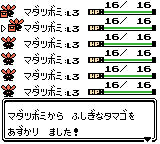
- Check that the two Pokémon you moved to your party are holding ふしぎなタマゴ (Mystery Eggs). If they are, take them to obtain two ふしぎなタマゴ (Mystery Eggs).
- If only one of the Pokémon is holding a ふしぎなタマゴ (Mystery Egg), obtain two ふしぎなタマゴ (Mystery Eggs) by duplicating it.
It is recommended to save after obtaining two ふしぎなタマゴ (Mystery Eggs).
Step 6: Arbitrary Code Execution Setup
- Arrange your party so that the Pokémon with the OT name "てばま" are in the 3rd and 4th slots.
- Open the Ball Pocket, ensure you only have Poké Balls, and set the quantity to 1, 2, 4, or 5.
- Open the Key Items Pocket, press SELECT on the first ふしぎなタマゴ (Mystery Egg), then press SELECT on the second ふしぎなタマゴ (Mystery Egg).
- A ball with a quantity of 255 will appear in the Ball Pocket. Toss balls until 17 remain.
- From the PC, select "どうぐをあずける (Deposit Item)" and deposit the 17 balls and the Mystery Eggs in order.
- Move the 17 balls in the 14th slot of the Ball Pocket to the 65th slot of the Ball Pocket.
- The 64th slot of the Ball Pocket will have a non-zero number, so use this as a guide to move to the 65th slot.
- After moving, verify that the quantity of the 65th item in the Ball Pocket is 17.
- If the Pokégear disappears from the menu, the arbitrary code execution environment setup is complete.
Step 7: Simplified RAM Writer Setup
Change the Box names as follows:
Box 2: ダだゲムよダだガ
Box 3: だじダムキづごぱ
Box 4: ヅまてへぎまぴよ
Box 5: へぎまボぷへぎま
Box 6: へォひひ はァリ
Box 7: どダれはリダだや
Box 8: ざダれ?よダリ
Box 9: だかがよぜ?だを
After changing the Box names, give a Pokémon the following Mail:
ぞ?ムぞボデののえよなゥゅリだっ
If you are having trouble with the Japanese input method, please refer to the following page.
After creating the Mail, read its contents. Then, you can start the simplified RAM Writer by opening the Pokédex.
Simplified RAM Writer
From now on, you can start the simplified RAM Writer each time you read the above Mail and then open the Pokédex.
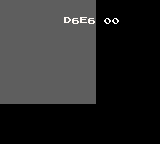
D6E6 on the left is the memory address being written to, and 00 on the right is its content. Note that the display of A, B, and C is abnormal in this simplified RAM Writer. A is g, B is a horizontal line, and C is a phone icon.
B: Address -01
A: Address +01
↑: Value -01
↓: Value +01
←: Value -10
→: Value +10
START: Exit
SELECT: Execute code from D6E6 (be careful not to press this before entering a program)
Step 8: RAM Writer Setup
Use the simplified RAM Writer to input the RAM Writer program. Once input is complete, you can start the RAM Writer by pressing the Select button. It is recommended to press the Start button to exit the simplified RAM Writer and save before starting the RAM Writer.
| Address | Value |
|---|---|
| D6E6 | CD |
| D6E7 | A8 |
| D6E8 | 34 |
| D6E9 | CD |
| D6EA | AE |
| D6EB | 33 |
| D6EC | CD |
| D6ED | 87 |
| D6EE | 0D |
| D6EF | CD |
| D6F0 | 95 |
| D6F1 | 0D |
| D6F2 | 11 |
| D6F3 | F2 |
| D6F4 | 40 |
| D6F5 | 21 |
| D6F6 | 00 |
| D6F7 | 96 |
| D6F8 | 01 |
| D6F9 | 19 |
| D6FA | 3E |
| D6FB | CD |
| D6FC | 5B |
| D6FD | 0E |
| D6FE | F0 |
| D6FF | 9F |
| D700 | F5 |
| D701 | 21 |
| D702 | 00 |
| D703 | D0 |
| D704 | CD |
| D705 | 42 |
| D706 | D7 |
| D707 | E5 |
| D708 | 11 |
| D709 | F8 |
| D70A | FF |
| D70B | 19 |
| D70C | E5 |
| D70D | D1 |
| D70E | 21 |
| D70F | A9 |
| D710 | C3 |
| D711 | F0 |
| D712 | 9F |
| D713 | CD |
| D714 | 9D |
| D715 | 30 |
| D716 | CD |
| D717 | 8B |
| D718 | D7 |
| D719 | 01 |
| D71A | 0C |
| D71B | 00 |
| D71C | 36 |
| D71D | 7C |
| D71E | 23 |
| D71F | 7A |
| D720 | CD |
| D721 | 8B |
| D722 | D7 |
| D723 | 7B |
| D724 | CD |
| D725 | 8B |
| D726 | D7 |
| D727 | 36 |
| D728 | 7F |
| D729 | 23 |
| D72A | 1A |
| D72B | CD |
| D72C | 8B |
| D72D | D7 |
| D72E | 13 |
| D72F | 36 |
| D730 | 7C |
| D731 | 09 |
| D732 | 7C |
| D733 | FE |
| D734 | C6 |
| D735 | 20 |
| D736 | E5 |
| D737 | CD |
| D738 | AD |
| D739 | 30 |
| D73A | 3E |
| D73B | ED |
| D73C | EA |
| D73D | 4B |
| D73E | C4 |
| D73F | E1 |
| D740 | 18 |
| D741 | C2 |
| D742 | CD |
| D743 | F4 |
| D744 | 36 |
| D745 | F0 |
| D746 | AB |
| D747 | 5F |
| D748 | 01 |
| D749 | 01 |
| D74A | 00 |
| D74B | 07 |
| D74C | 38 |
| D74D | 18 |
| D74E | 0B |
| D74F | 0B |
| D750 | 07 |
| D751 | 38 |
| D752 | 13 |
| D753 | 0E |
| D754 | F0 |
| D755 | 07 |
| D756 | 38 |
| D757 | 0E |
| D758 | 01 |
| D759 | 10 |
| D75A | 00 |
| D75B | 07 |
| D75C | 38 |
| D75D | 08 |
| D75E | 48 |
| D75F | 07 |
| D760 | 30 |
| D761 | 04 |
| D762 | E1 |
| D763 | F1 |
| D764 | D7 |
| D765 | C9 |
| D766 | 7B |
| D767 | 0F |
| D768 | 30 |
| D769 | 10 |
| D76A | 0F |
| D76B | 0F |
| D76C | 30 |
| D76D | 01 |
| D76E | E9 |
| D76F | F0 |
| D770 | 9F |
| D771 | CD |
| D772 | 9D |
| D773 | 30 |
| D774 | 79 |
| D775 | 86 |
| D776 | 77 |
| D777 | C3 |
| D778 | AD |
| D779 | 30 |
| D77A | 0F |
| D77B | 38 |
| D77C | 05 |
| D77D | 0F |
| D77E | 38 |
| D77F | 06 |
| D780 | 09 |
| D781 | C9 |
| D782 | 79 |
| D783 | 84 |
| D784 | 67 |
| D785 | C9 |
| D786 | F0 |
| D787 | 9F |
| D788 | 81 |
| D789 | D7 |
| D78A | C9 |
| D78B | F5 |
| D78C | CB |
| D78D | 37 |
| D78E | CD |
| D78F | 92 |
| D790 | D7 |
| D791 | F1 |
| D792 | E6 |
| D793 | 0F |
| D794 | C6 |
| D795 | F6 |
| D796 | F6 |
| D797 | 60 |
| D798 | 22 |
| D799 | C9 |
RAM Writer
From now on, you can start the RAM Writer each time you start the simplified RAM Writer and press the Select button.
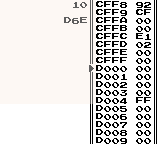
The 10 on the top of the screen is the current ROM bank and SRAM bank.
↑: Address -01
↓: Address +01
←: Address -10
→: Address +10
B+↑: Address -100
B+↓: Address +100
B+←: Address -1000
B+→: Address +1000
A+↑: Value -01
A+↓: Value +01
A+←: Value -10
A+→: Value +10
START: Exit
SELECT+↑: Bank -01
SELECT+↓: Bank +01
SELECT+←: Bank -10
SELECT+→: Bank +10
SELECT+A: Execute code from the current address (use with caution)
Use the RAM Writer to change the contents of addresses D418-D41A and DD90-DD9B as follows:
| Address | Value |
|---|---|
| D418 | C3 |
| D419 | E6 |
| D41A | D6 |
| DD90 | 3E |
| DD91 | E1 |
| DD92 | EA |
| DD93 | FC |
| DD94 | CF |
| DD95 | 3E |
| DD96 | 03 |
| DD97 | 21 |
| DD98 | 31 |
| DD99 | 56 |
| DD9A | CF |
| DD9B | C9 |
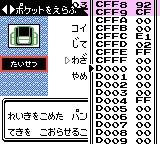
After changing, put the cursor on address DD90 and press SELECT+A to obtain TM33 in the key items pocket. Each time you use this TM33, you can directly start the RAM Writer.
Step 9: Restore Normal State
Various side effects occur from the RAM Writer setup.
- Player's name
- Ball pocket
- PC Items
- Pokégear
- Pokédex
- Box names
- Party Pokémon
- Box deposited Pokémon
Player's Name
Set the ROM bank to 01, move the cursor to address 6237, and press SELECT+A to set the player's name. After naming, press the START button once to exit the RAM Writer.
Ball Pocket
Set the contents of addresses D5EF to D5F4 to 02 A0 01 05 02 FF to normalize the Ball pocket.
PC Items
Set the content of address D60A to FF to restore the PC Items section.
Pokégear
Move the content of address D66D to address D66F and set the content of address D670 to 00 to restore it.
Pokédex
Set the content of address D671 to 00 to normalize the Pokédex.
Box Names
After setting up the RAM Writer with TM33, you can change Box names as you like.
Set the ROM bank to 01, move the cursor to address 5D16, and press SELECT+A to reset Box names to their defaults.
Party Pokémon
Set your first Pokémon as the party leader, set the content of address D9E8 to 01, and set the content of address D9EA to FF to make your party consist of only your first Pokémon.
Box deposited Pokémon
You can empty the contents of the boxes by setting the SRAM bank to 01 and changing the contents of addresses AD10 and AD11 to 00 FF.
OT Name
Use the RAM Writer to change the contents of addresses DDA0-DDAB as follows:
| Address | Value |
|---|---|
| DDA0 | 01 |
| DDA1 | 06 |
| DDA2 | 00 |
| DDA3 | 11 |
| DDA4 | 10 |
| DDA5 | DB |
| DDA6 | 21 |
| DDA7 | B5 |
| DDA8 | D1 |
| DDA9 | C3 |
| DDAA | D6 |
| DDAB | 30 |
After changing, move the cursor to address DDA0 and press SELECT+A to change the OT name of your first party Pokémon to the protagonist's name.
Usage Guide
Once you have installed a RAM Writer, see the following article to learn how to use it.
📄RAM Writer Usage Guide in Pokémon Gold/Silver/Crystal (JP)
Precautions
Do not edit addresses D418-D41A, and D6E6-D799 with the RAM Writer.